
Step 1 - Download Ollama onto your locally connected device
You can download and install Ollama on a device running macOS, Windows or Linux from their website docs.ollama.com
Open Ollama, under settings, make sure to select 'expose Ollama to the network'
On a Mac, find your Mac’s IP address
-
Click the Apple menu in the top-left corner.
-
Select System Settings.
-
Click Network in the left-hand menu.
-
Select the connection you are using:
-
Wi-Fi if connected wirelessly, or
-
Ethernet if connected by cable.
-
-
Click Details…
-
Select TCP/IP.
-
Your IP address is shown next to IP Address — for example, 192.168.3.24.
If you are running ArchitectBuddies™ on iPad, allow local network access when ArchitectBuddies™ asks (or later in Settings → Privacy & Security → Local Network)
Step 2 - Enter your device's IP address and the Ollama port number
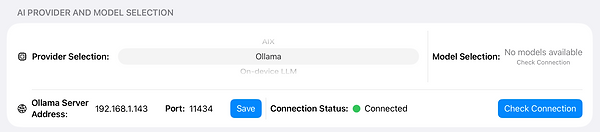
Click on the IP address field to open the decimal pad, then the port number
The Connection Status will change from 'Not configured' to 'Connected'
Models that you have downloaded in Ollama will be selectable under Model Selection
Tip: Press Check Connection to refresh the Status and Model list